When creating an app that utilizes LLMs, it’s crucial that the generated response gets back to the user as fast as possible. Each second is a huge gain in terms of UX.
Django in itself is not the fastest kid on the block, the main point of attraction is that it is “batteries included” - most of the packages you need are already there.
When it comes to streaming LLMs, we need to think about how we’re going to send the response back to the user.
We have 3 main ways to communicate with the client in Django:
- Websockets
- Server-Sent Events (SSE)
- REST API
Without any further ado, here’s an overview:
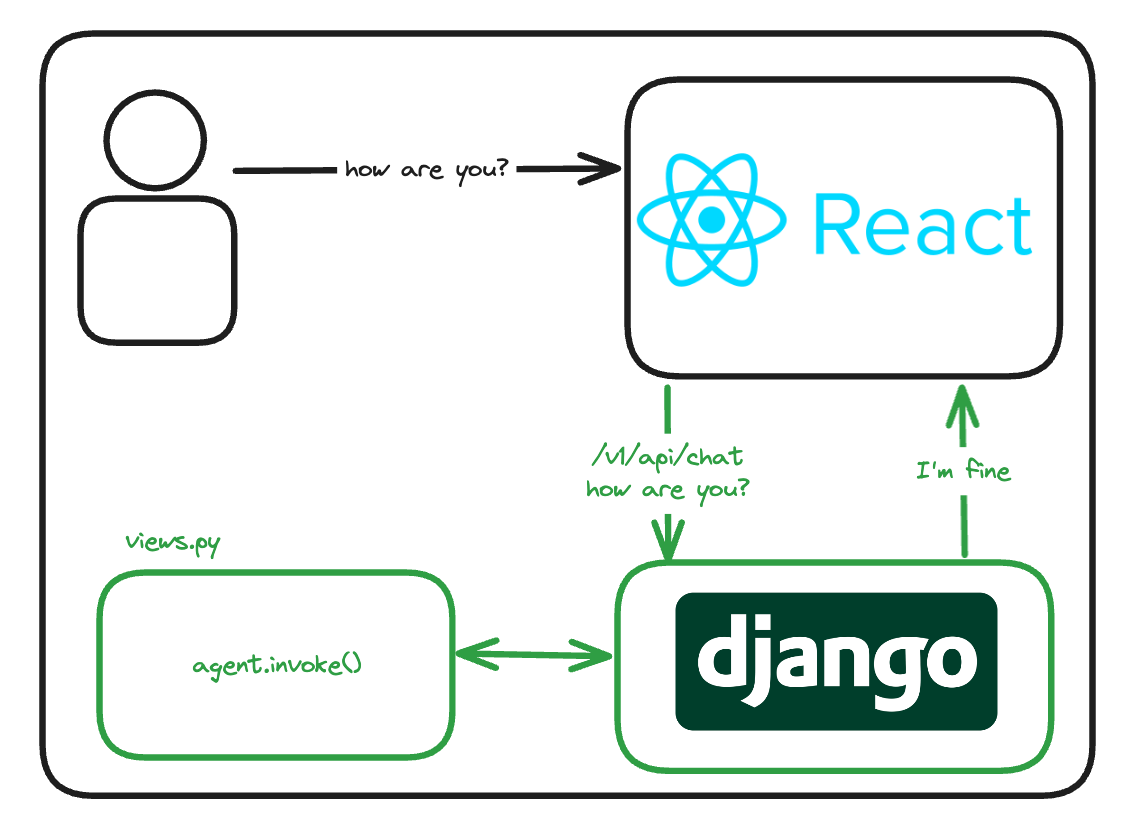
REST
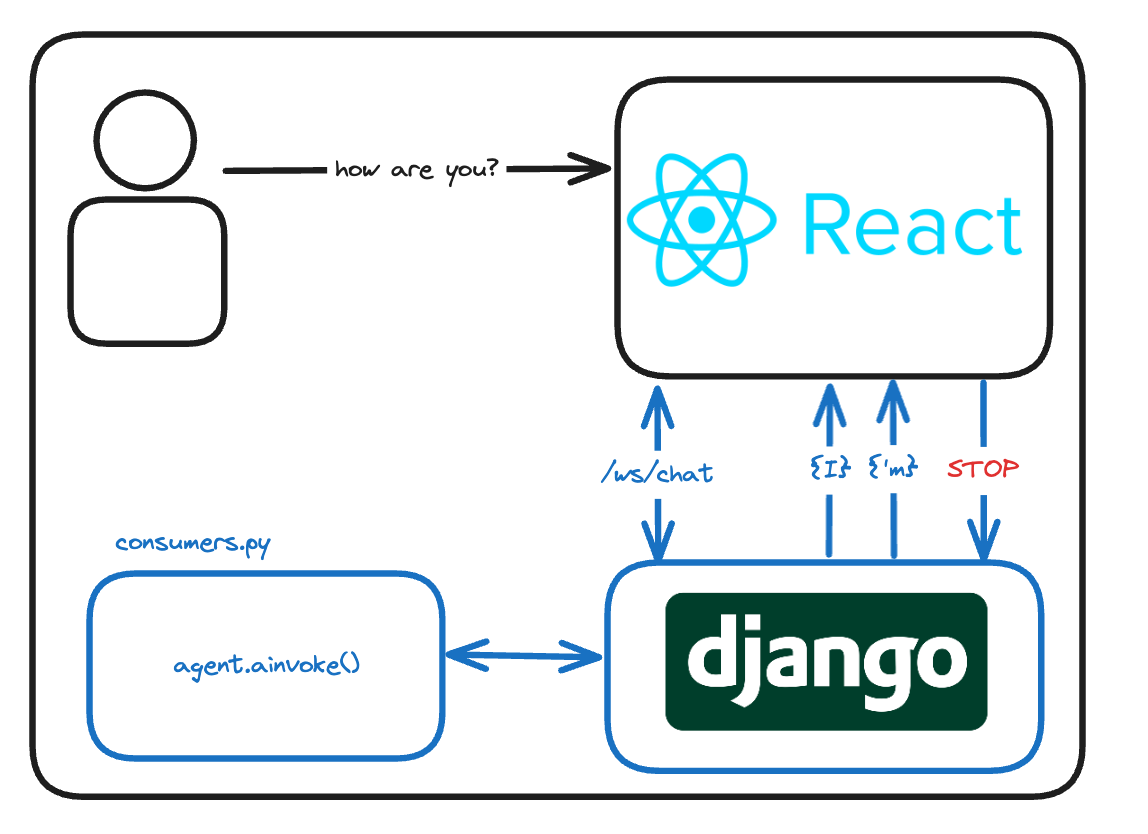
Websockets
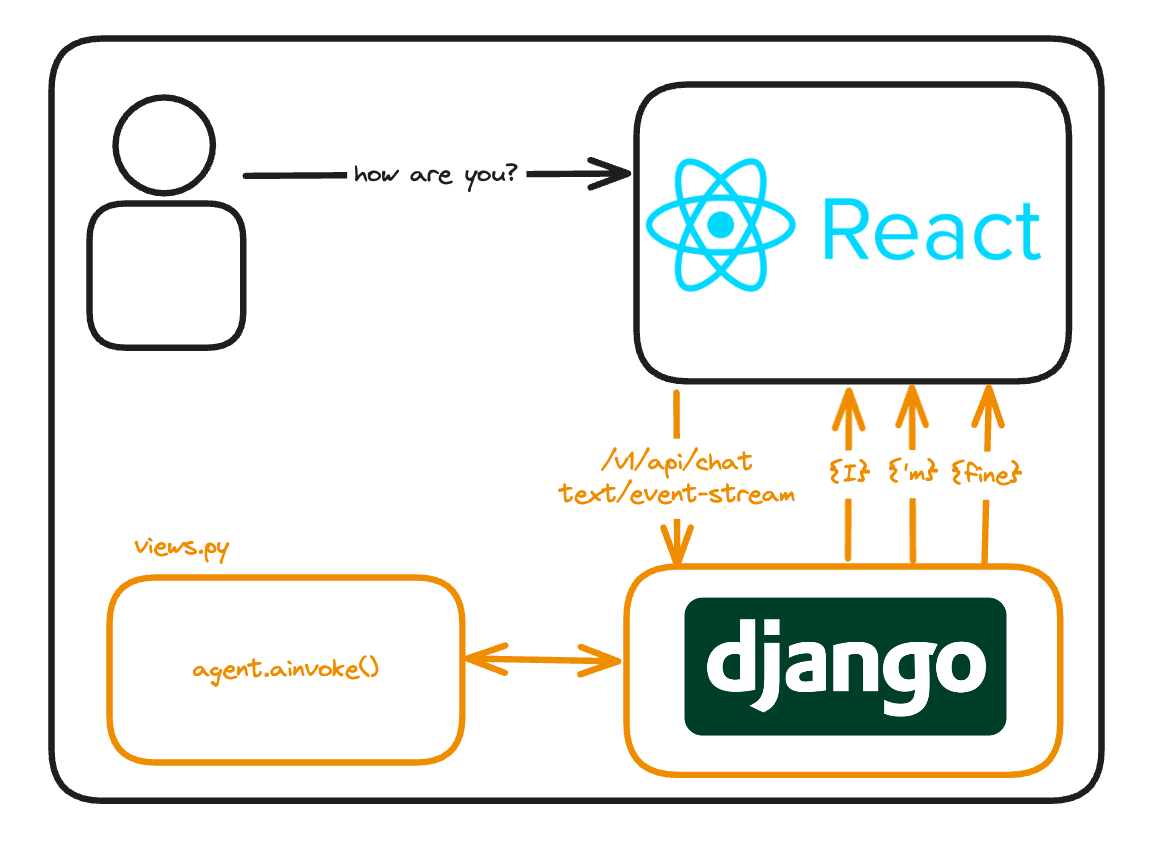
Server-Sent Events
REST
You’re probably the most familiar with this one, you set up a django project and create a view that returns a JSON response. The client then fetches this response and displays it. I’m gonna use LangChain to demonstrate this
# views.py
class TODOView(APIView):
    def get(self, request, *args, **kwargs):
        todos = ["Buy groceries", "Clean the house", "Cook dinner"]
        return Response(data={"todos": todos}, status=status.HTTP_200_OK)
A basic chat endpoint could look something like this
# views.py
from langchain_openai import ChatOpenAI
from langchain_core.output_parsers import StrOutputParser
from langchain_core.prompts import ChatPromptTemplate

model = ChatOpenAI(model="gpt-4")
prompt = ChatPromptTemplate.from_template("User's message: {topic}")
output_parser = StrOutputParser()
chain = prompt | model | output_parser


def chat(message):
    response = chain.invoke({"topic": message})
    return response

class ChatView(APIView):
    def post(self, request, *args, **kwargs):
        message = request.data.get("message")
        response = chat(message)
        return Response(data={"response": response}, status=status.HTTP_200_OK)
Why would you use this approach?
| Pros | Cons |
|---|---|
| Easy to implement | Time until text is displayed to the user is not immediate |
| Scalable with Django | |
| Can leverage existing Django infrastructure | |
| Integrates well with RESTful services |
For an MVP or a demo, REST APIs are a great choice. They’re easy to set up and you can get a working prototype in no time.
Looking at the above table, it might look like a no-brainer to go with REST. And eventually, I think that this will be true (maybe even now with groq’s insane speed), but for now - LLMs are slow. They take a lot of time to generate a response. The longer the user has to wait to see the firs token appear on the screen, the more likely they are to leave the page and generally feel less satisfied.
That’s why for production apps, streaming tokens is the way to go.
When it comes to streaming, we have 2 main options
Websockets
Websockets are a great way to stream data to the client. They’re bi-directional, meaning that the client can send data to the server as well. Unfortunately, they’re quite annoying to maintain as well as to set up.
They open some very interesting possibilities, this solution is for when you want to make something more complicated.
The websockets implementation is a bit more complicated.
First, you need channels - it’s a package made by the Django team for handling websockets.
Alongside it, you want daphne - an ASGI server,
poetry add 'channels[daphne]'
Then in your INSTALLED_APPS in settings.py add
# settings.py
INSTALLED_APPS = [
    ...
    "daphne",
    "channels",
    ...
]
Next, you would add a CHANNEL_LAYERS setting alongside ASGI_APPLICATION
# settings.py
CHANNEL_LAYERS = {
    "default": {
        "BACKEND": "channels.layers.InMemoryChannelLayer"
    }
}
ASGI_APPLICATION = 'mysite.asgi.application'
In this case we’re using InMemoryChannelLayer, you can also use RedisChannelLayer in case you’d like to integrate with your Redis instance.
We need something to receive the messages, so let’s create a consumer
# consumer.py
from channels.generic.websocket import WebsocketConsumer
import json
from langchain_openai import ChatOpenAI

model = ChatOpenAI(model="gpt-4o")

class ChatConsumer(WebsocketConsumer):
    async def connect(self):
        self.accept()

    async def disconnect(self, close_code):
        pass

    async def receive(self, text_data):
        text_data_json = json.loads(text_data)
        message = text_data_json["message"]
        async for chunk in model.astream(message):
            await self.send(text_data=json.dumps({"message": chunk.content}))
For more details about implementation (as well as an example on how to connect a frontend), I recommend this article on Medium
Why would you use this approach?
| Pros | Cons |
|---|---|
| Immediate response | Harder to set up/maintain |
| Consume less resources | Connection lifetime handling |
| Less latency |
This choice is the most reactive one:
- The user sees the first token immediately
- The user can send messages to the server (interrupt the LLM, call tools, etc.)
Server-Sent Events
If you just want to stream data to the client, SSE is a great choice. It’s a one-way communication channel, which means that only the server can push data to the client.
To be honest, I’ve only implemented SSE in FastAPI. For django, I’ve found this repository django-evenstream and this really good article
The idea is to use a generator on the backend and consume it with an EventSource on the frontend.
idea of implementation in Django
def sse_stream(request):
    def event_stream():
        message = "Hi, I'm a message from the server"
        for character in message:
            # Simulate some event data
            data = {'message': character}
            yield f"data: {json.dumps(data)}\n\n"
            time.sleep(1)

    return StreamingHttpResponse(event_stream(), content_type='text/event-stream')
and on the frontend
const eventSource = new EventSource("http://127.0.0.1:8000/sse_stream");
eventSource.onmessage = function (event) {
  console.log(event.data);
};
Why would you use this approach?
| Pros | Cons |
|---|---|
| Easier to set up compared to websockets | No bi-directional communication |
| Immediate response | |
| Built in reconnection support |
Summary
In the end, I find that SSE are the best choice for streaming output, most of the time you won’t need the bi-directional communication that websockets provide. The REST approach will be good for demos, and even then a streaming approach looks better in terms of UX.